【随手记】Nginx?开卷!

【随手记】Nginx?开卷!
客怎眠qvq🍭 前言
老大安排的,被迫营业,去给同事讲 Nginx。别急着走嘛🫠文章中的几个例子很简单的。
ℹ️ 基本介绍(可跳过,但强烈建议看看)
Nginx 是一个高性能的 HTTP 服务器和反向代理,它以其稳定性、丰富的功能集、简单的配置和低资源消耗而闻名。Nginx主要用来处理HTTP请求,提供负载均衡、静态内容服务、反向代理等功能。
正向代理:居家办公用过公司的内网VPN吧,你所有的请求在发送前,被代理成了内网的IP去获取内网的资源,如数据库、私有代码仓库等。
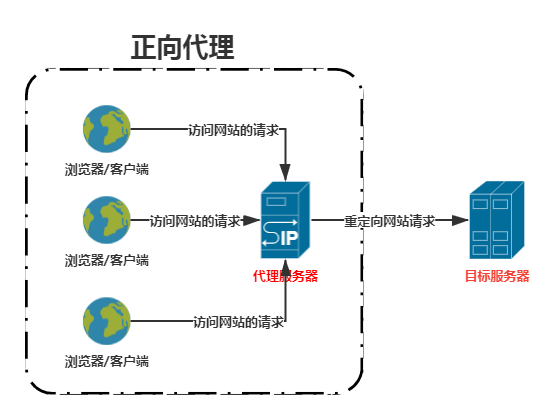
反向代理:业务中经常用到,所有前端的请求被发送到同一个端口(80),通过Nginx监听转发到相应的前端、后端上。比如 前端Vue项目启动在8080上,但它不会被直接访问,只会从80端口被转发到8080,用户浏览器显示的站点还是原站点,只是内容变成了8080的页面。
🚑 热备(backup):服务器界的“备胎”,一台服务器故障,另一台马上顶上。
🎭 轮询:请求按顺序分发到服务器,雨露均沾。
⚖️ 加权轮询(weight):根据配置的权重大小而分发给不同服务器不同数量的请求,可根据服务器配置调整对应权重,让强壮的服务器多干点活,降低其他服务器负载。
🔄 ip_hash:让相同IP的客户端总是访问同一个服务器,保持会话一致性。

🔑 参数配置
Nginx 的主配置文件通常位于以下位置📍:
- linux系统:
/etc/nginx/nginx.conf - Windows系统:随Nginx安装路径而变化,在安装目录下的
conf\nginx.conf中,如果你安装在D:/program/nginx-1.22,那么配置文件就在D:/program/nginx-1.22/conf/nginx.conf
其配置结构如下:
1 | -——全局块 |
Nginx默认配置及说明如下:1
2
3
4
5
6
7
8
9
10
11
12
13
14
15
16
17
18
19
20
21
22
23
24
25
26
27
28
29
30
31
32
33
34
35
36
37
38
39
40
41
42
43
44
45
46
47
48
49
50
51
52
53
54
55
56
57
58
59
60
61
62
63
64
65
66
67
68
69
70
71
72
73
74
75
76
77
78
79
80
81
82
83
84
85
86
87
88
89
90
91
92
93
94
95
96
97
98
99
100
101
102
103
104
105
106
107
108
109
110
111
112
113
114
115
116#
#user nobody;
worker_processes 1;
#error_log logs/error.log;
#error_log logs/error.log notice;
#error_log logs/error.log info;
#pid logs/nginx.pid;
events {
worker_connections 1024;
}
http {
include mime.types;
default_type application/octet-stream;
#log_format main '$remote_addr - $remote_user [$time_local] "$request" '
# '$status $body_bytes_sent "$http_referer" '
# '"$http_user_agent" "$http_x_forwarded_for"';
#access_log logs/access.log main;
sendfile on;
#tcp_nopush on;
#keepalive_timeout 0;
keepalive_timeout 65;
#gzip on;
server {
listen 80;
server_name localhost;
#charset koi8-r;
#access_log logs/host.access.log main;
location / {
root html;
index index.html index.htm;
}
#error_page 404 /404.html;
# redirect server error pages to the static page /50x.html
#
error_page 500 502 503 504 /50x.html;
location = /50x.html {
root html;
}
# proxy the PHP scripts to Apache listening on 127.0.0.1:80
#
#location ~ \.php$ {
# proxy_pass http://127.0.0.1;
#}
# pass the PHP scripts to FastCGI server listening on 127.0.0.1:9000
#
#location ~ \.php$ {
# root html;
# fastcgi_pass 127.0.0.1:9000;
# fastcgi_index index.php;
# fastcgi_param SCRIPT_FILENAME /scripts$fastcgi_script_name;
# include fastcgi_params;
#}
# deny access to .htaccess files, if Apache's document root
# concurs with nginx's one
#
#location ~ /\.ht {
# deny all;
#}
}
# another virtual host using mix of IP-, name-, and port-based configuration
#
#server {
# listen 8000;
# listen somename:8080;
# server_name somename alias another.alias;
# location / {
# root html;
# index index.html index.htm;
# }
#}
# HTTPS server
#
#server {
# listen 443 ssl;
# server_name localhost;
# ssl_certificate cert.pem;
# ssl_certificate_key cert.key;
# ssl_session_cache shared:SSL:1m;
# ssl_session_timeout 5m;
# ssl_ciphers HIGH:!aNULL:!MD5;
# ssl_prefer_server_ciphers on;
# location / {
# root html;
# index index.html index.htm;
# }
#}
}
1 | ########### 每个指令必须有分号结束。################# |
🌰 案例教学
🔝 location 匹配优先级(不讲后缀匹配)
1、精准匹配 (优先级最高)
1 | #将所有对根域名的请求都重定向到统一认证的地址 |
2、正则前缀匹配(匹配到后,停止搜索)
1 | #所有匹配到 /images/ 请求都会转发到静态资源服务器的images路径下 |
3、不区分大小写、区分大小写的前缀匹配(~* 优先级高于 ~,但仍会向下搜索)
1 | location ~* /upload { |
4、前缀匹配(最常用)
1 | location /api/weekly { |
5、通用匹配(任何未匹配到的请求都会走这条配置,由于与1的精准匹配重叠,所以不会生效)
1 | location / { |
优先级及匹配字符长度相同的情况下,按location块先后顺序决定优先级
➡️ root路径映射
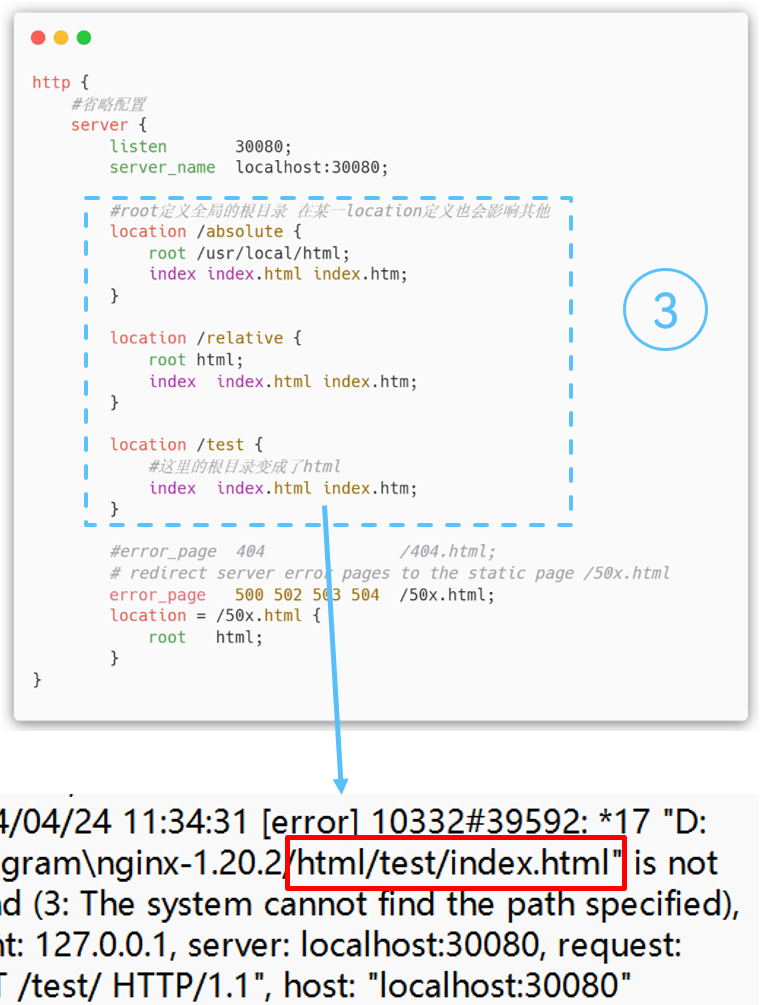
root被用来统一查找文件时的根目录,路径映射规则简单直观。它可以在http、server、location中定义,可单独使用。路径映射的规则可以直接参照linux命令行。
- 作用:定义全局的根目录,可被子模块中的root配置覆盖。
- 位置:可以在http、server、location中定义,可单独使用。
- 映射规则:可以相对路径、可以是绝对路径。
1 | # 通用匹配只能有一条,多条nginx -t 检查会报错 |
🔍 root 与 alias 的区别
路径
root的处理结果:root路径+location路径
alias的处理结果:使用alias路径替换location路径
alias是一个目录别名的定义,root则是最上层目录的定义作用域
alias只能作用在location中;而root可以存在server、http和location中,且会影响其他块。语法格式
alias后面必须要用 “/” 结束,不然会被认为是个文件,而找不到对应的目录;而root则对 “/” 可有可无。alias不支持直接使用正则,但可以获取location匹配的参数,且必须使用。
在同一个 location 块中,不能同时使用 root 和 alias。
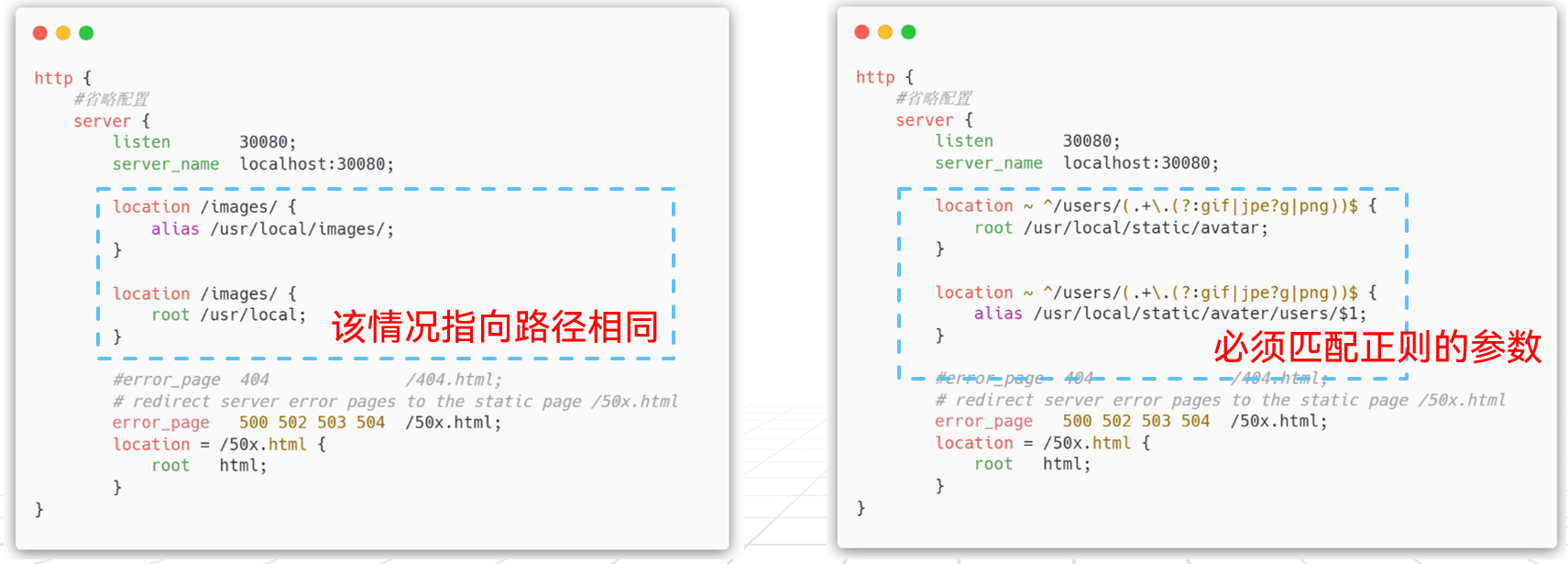
建议在server块中定义全局的根目录,在location块中根据需要配置alias。如果需要正则匹配实现alias的效果,就用到了rewrite。
↩️ rewrite重写
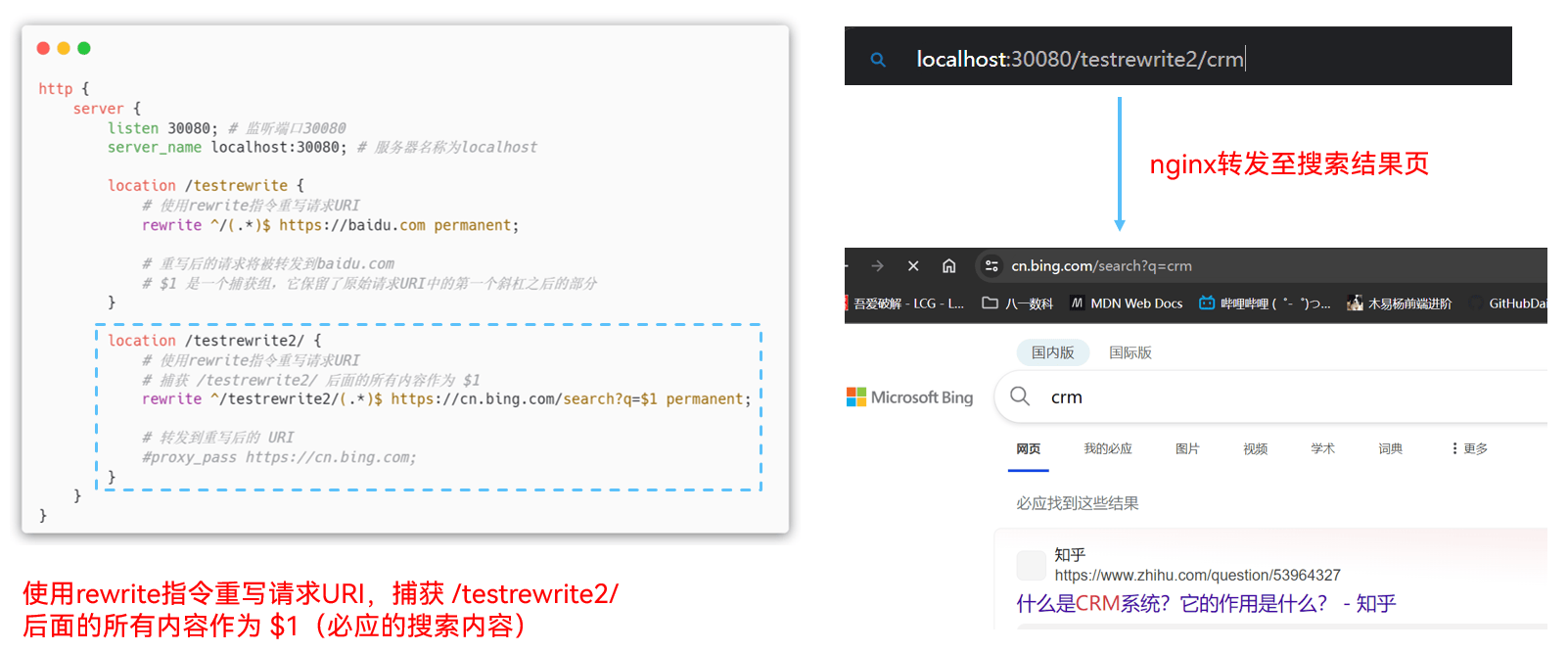
rewrite 指令是 Nginx 中的瑞士军刀,它可以用来重写请求URI,实现各种灵活的跳转和路由。
1 | rewrite <regex> <replacement> [flag]; |
1 | location /testrewrite { |